目前只是能用,但很丑陋,大佬们可以一起来DIY搞搞,折腾折腾,嘎嘎嘎
之前看了大佬们用的MyNodeQuery三网延迟监控感觉很酷!自己用的哪吒,也想搞一搞,所有有了下面的瞎搞
后端变动
Task执行节点
在原始逻辑里,选执行Task的节点有两种策略:
- 覆盖所有,仅特定节点不请求
- 忽略所有,仅通过特定节点请求
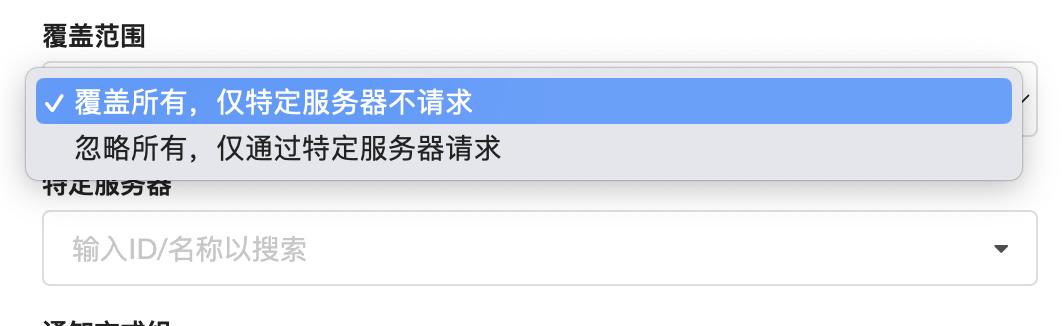
但上面两种策略,都只会选择出一个节点执行Task,具体可以看下代码,Send一次之后直接break
func DispatchTask(serviceSentinelDispatchBus <-chan model.Monitor) {
	workedServerIndex := 0
	for task := range serviceSentinelDispatchBus {
		round := 0
		endIndex := workedServerIndex
		singleton.SortedServerLock.RLock()
		// 如果已经轮了一整圈又轮到自己,没有合适机器去请求,跳出循环
		for round < 1 || workedServerIndex = len(singleton.SortedServerList) {
				workedServerIndex = 0
				round
				continue
			}
			// 如果服务器不在线,跳过这个服务器
			if singleton.SortedServerList[workedServerIndex].TaskStream == nil {
				workedServerIndex
				continue
			}
			// 如果此任务不可使用此服务器请求,跳过这个服务器(有些 IPv6 only 开了 NAT64 的机器请求 IPv4 总会出问题)
			if (task.Cover == model.MonitorCoverAll && task.SkipServers[singleton.SortedServerList[workedServerIndex].ID]) ||
				(task.Cover == model.MonitorCoverIgnoreAll && !task.SkipServers[singleton.SortedServerList[workedServerIndex].ID]) {
				workedServerIndex
				continue
			}
			// 找到合适机器执行任务,跳出循环
			singleton.SortedServerList[workedServerIndex].TaskStream.Send(task.PB())
			workedServerIndex
			break
		}
		singleton.SortedServerLock.RUnlock()
	}
}
但在我们的场景中,预期是我选择多个节点,然后所有节点都会去Ping(除了特定节点),因此Send一次之后不能直接break需要继续查找节点。
{
// ..........
        if (task.Cover == model.MonitorCoverAll && task.SkipServers[singleton.SortedServerList[workedServerIndex].ID]) ||
        (task.Cover == model.MonitorCoverIgnoreAll && !task.SkipServers[singleton.SortedServerList[workedServerIndex].ID]) {
        workedServerIndex
        continue
      }
      if task.Cover == model.MonitorCoverIgnoreAll && task.SkipServers[singleton.SortedServerList[workedServerIndex].ID] {
        singleton.SortedServerList[workedServerIndex].TaskStream.Send(task.PB(singleton.SortedServerList[workedServerIndex].ID))
        workedServerIndex
        continue
      }
      if task.Cover == model.MonitorCoverAll && !task.SkipServers[singleton.SortedServerList[workedServerIndex].ID] {
        singleton.SortedServerList[workedServerIndex].TaskStream.Send(task.PB(singleton.SortedServerList[workedServerIndex].ID))
        workedServerIndex
        continue
      }
      // 找到合适机器执行任务,跳出循环
      // singleton.SortedServerList[workedServerIndex].TaskStream.Send(task.PB())
      // workedServerIndex
      // break
}
Task proto调整
当前执行Task的数据结构中,只存在MonitorId、MonitorType,仅通过这两个信息无法确定到底这个avg_delay具体时延是哪个节点Ping之后的结果。
- Before
message Task {
	uint64 id = 1;
	uint64 type = 2;
	string data = 3;
}

message TaskResult {
	uint64 id = 1;
	uint64 type = 2;
	float delay = 3;
	string data = 4;
	bool successful = 5;
}
- After
message Task {
    uint64 server_id = 4;
}

message TaskResult {
    uint64 server_id = 4;
}
新增了ServerID字段,因此通过ServerID MonitorID便可以确定一个TCPPing是谁Ping的谁。
Dashboard调整
在Dashboard中,需要接受Agent发送的请求,并进行处理,因此需要在接受请求的部分需要调整,需要将MonitorID ServerID AvgDelay存储下来
...
if mh.Type == model.TaskTypeTCPPing {
	monitorTcpMap, ok := ss.serviceResponseTCPPing[mh.GetId()]
	if !ok {
		monitorTcpMap = make(map[uint64]*tcppingStore)
		ss.serviceResponseTCPPing[mh.GetId()] = monitorTcpMap
	}
	ts, ok := monitorTcpMap[mh.GetServerId()]
	if !ok {
		ts = &tcppingStore{}
	}
	ts.count
	ts.ping = (ts.ping*float32(ts.count-1)   mh.Delay) / float32(ts.count)
	if ts.count == _CurrentTCPPingStatus {
		ts.count = 0
		if ts.ping > float32(Conf.MaxTCPPingValue) {
			ts.ping = float32(Conf.MaxTCPPingValue)
		}
		if err := DB.Create(&model.MonitorHistory{
			MonitorID: mh.GetId(),
			AvgDelay:  ts.ping,
			Data:      mh.Data,
			ServerID:  mh.GetServerId(),
		}).Error; err != nil {
			log.Println("NEZHA>> 服务监控数据持久化失败:", err)
		}
	}
	monitorTcpMap[mh.GetServerId()] = ts
	if !(rand.Intn(len(ServerList)) == 0) {
		continue
	}
}
...
Api新增
前端需要使用到Ajax动态更新流量图,因此需要提供一个Api查询NetworkMonitor,再展示出来
前端
前端使用vue echart jQuery
-
新增页面
Network页面

-
网络监控页面新增
TCPPing图
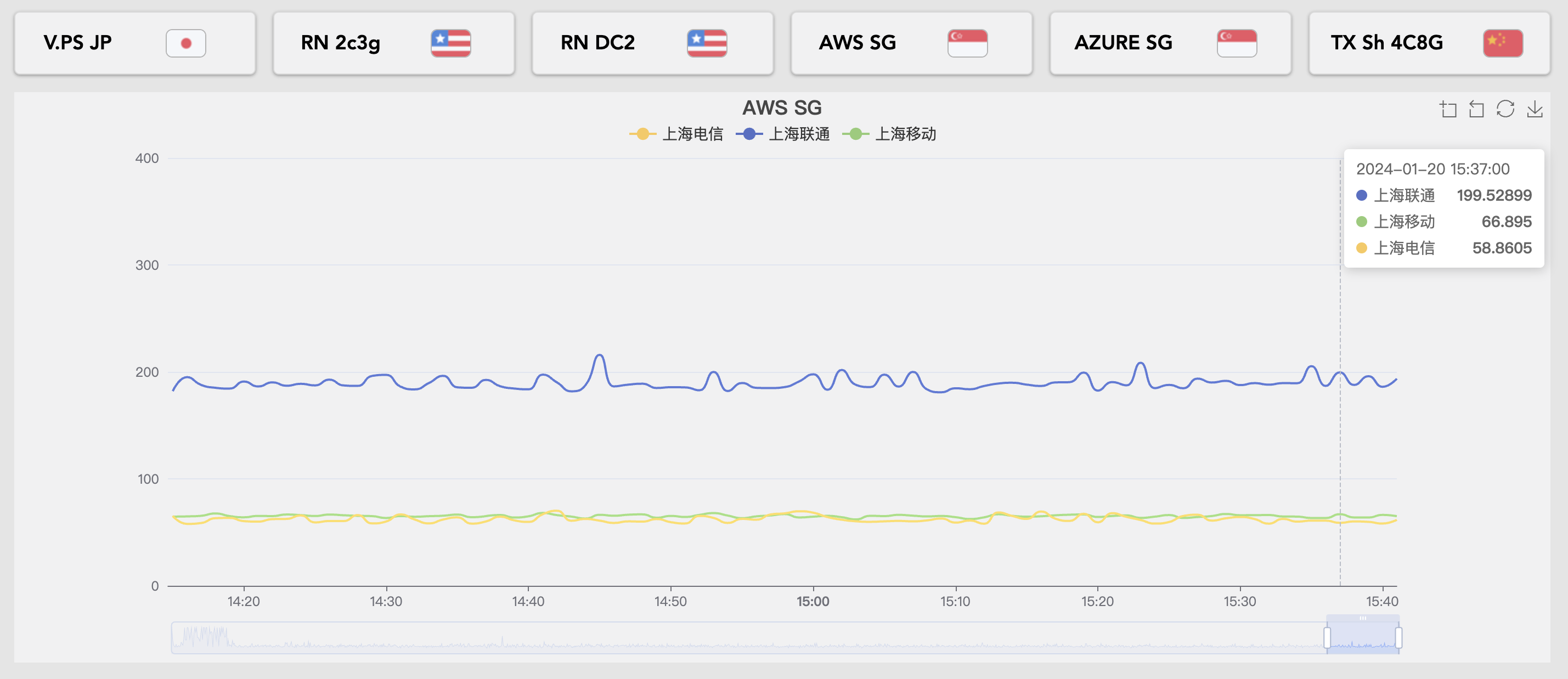
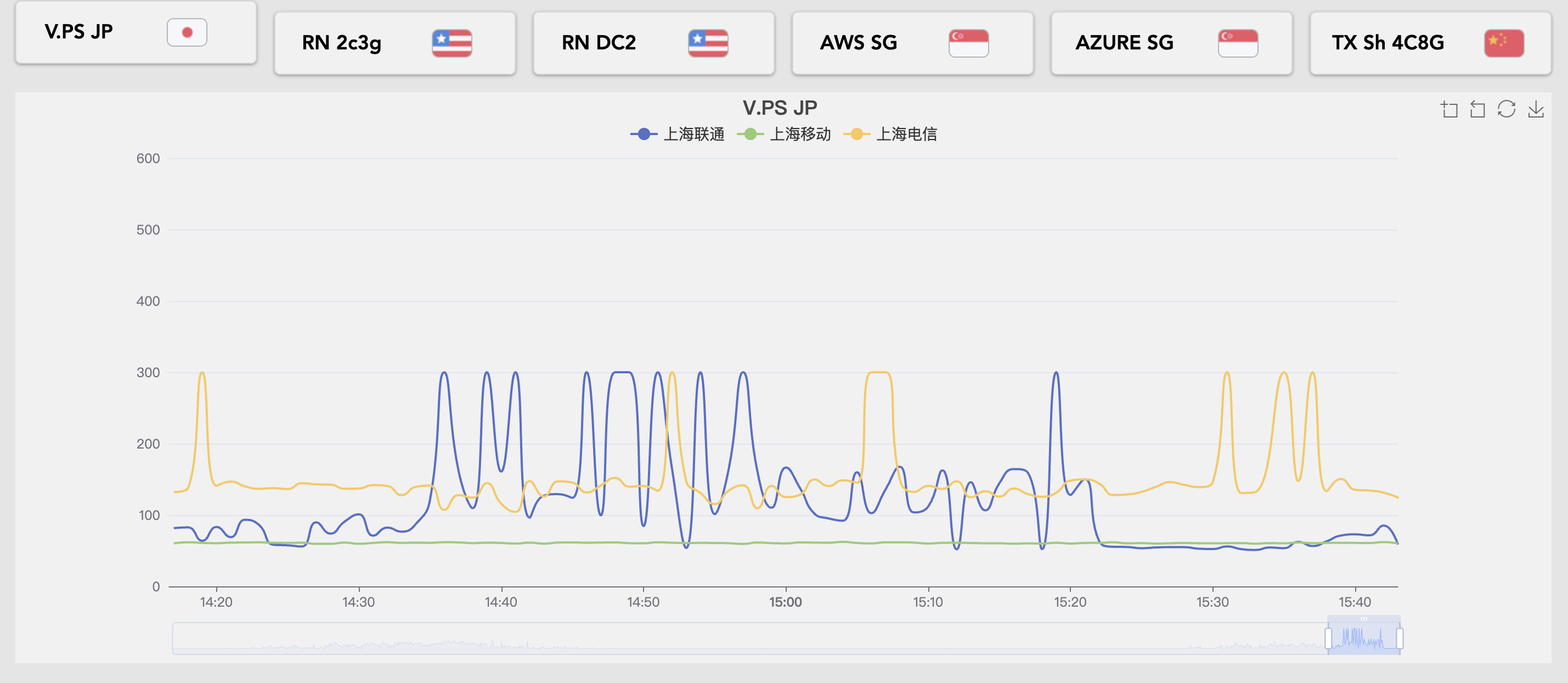
这是前两天中午cc,rn国内访问断了的TCPPing图

TODO
- 增加按天,周,月的纬度
- 后端采集了数据还有很多的优化空间,比如取样间隔等等
- 本小废物确实不太会前端,后端代码还有很多优化的部分Orz
使用
- 使用上可能需要自己编译下二进制
- 替换二进制
mv /opt/nezha/dashboard/app /opt/nezha/dashboard/app.old && cp /root/app /opt/nezha/dashboard/app && systemctl restart nezha-dashboard.service
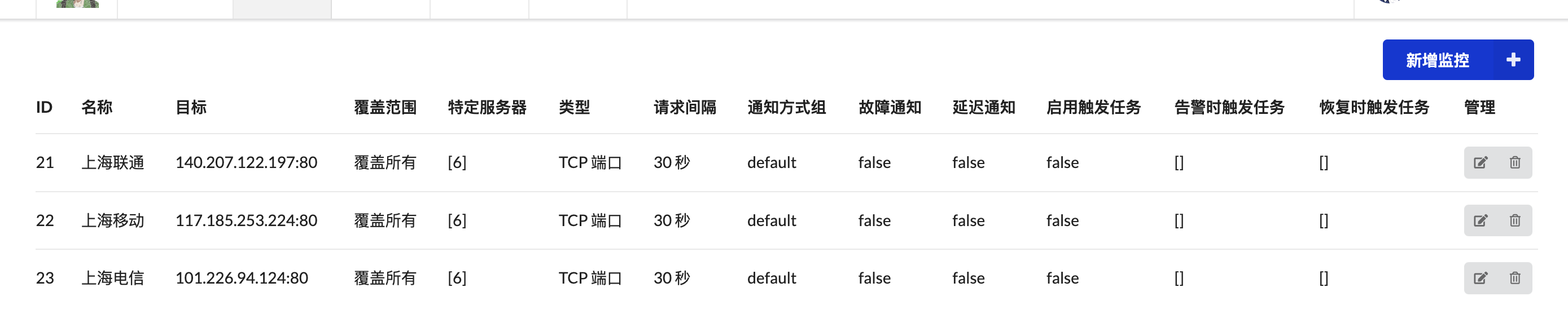
- 配置,举例:我离上海近,出口基本在上海,所以我希望看到我的vps到上海的tcpping,但是我又有国内的机器,这个是不需要ping的,具体配置如下:
- (代码写的很简陋,尤其是前端)但是!

- 修改后的nezha
- 修改后的nezha-agent
- 感谢FCB大佬发的帖子里面提供的地址,https://www.nodeseek.comhttp://127.0.0.1:5001/post-56400-1
- 感谢哪吒面板,真的不错!


不错
牛批
请参考新的食用教程
https://www.nodeseek.com/post-62122-1
以下内容失效0. 首先通过官网脚本安装再替换二进制https://nezha.wiki/guide/dashboard.html1. 二进制下载地址:http://vps15o.181000.xyz:9999/2.systemctl管理的dashboard更新方法3.docker管理的更新方法4. Agent 更新方法同上