FlowMaster - 开源的专业的网络流量监控系统
省流,开源地址在这里:https://github.com/vbskycn/FlowMaster


📝 项目介绍
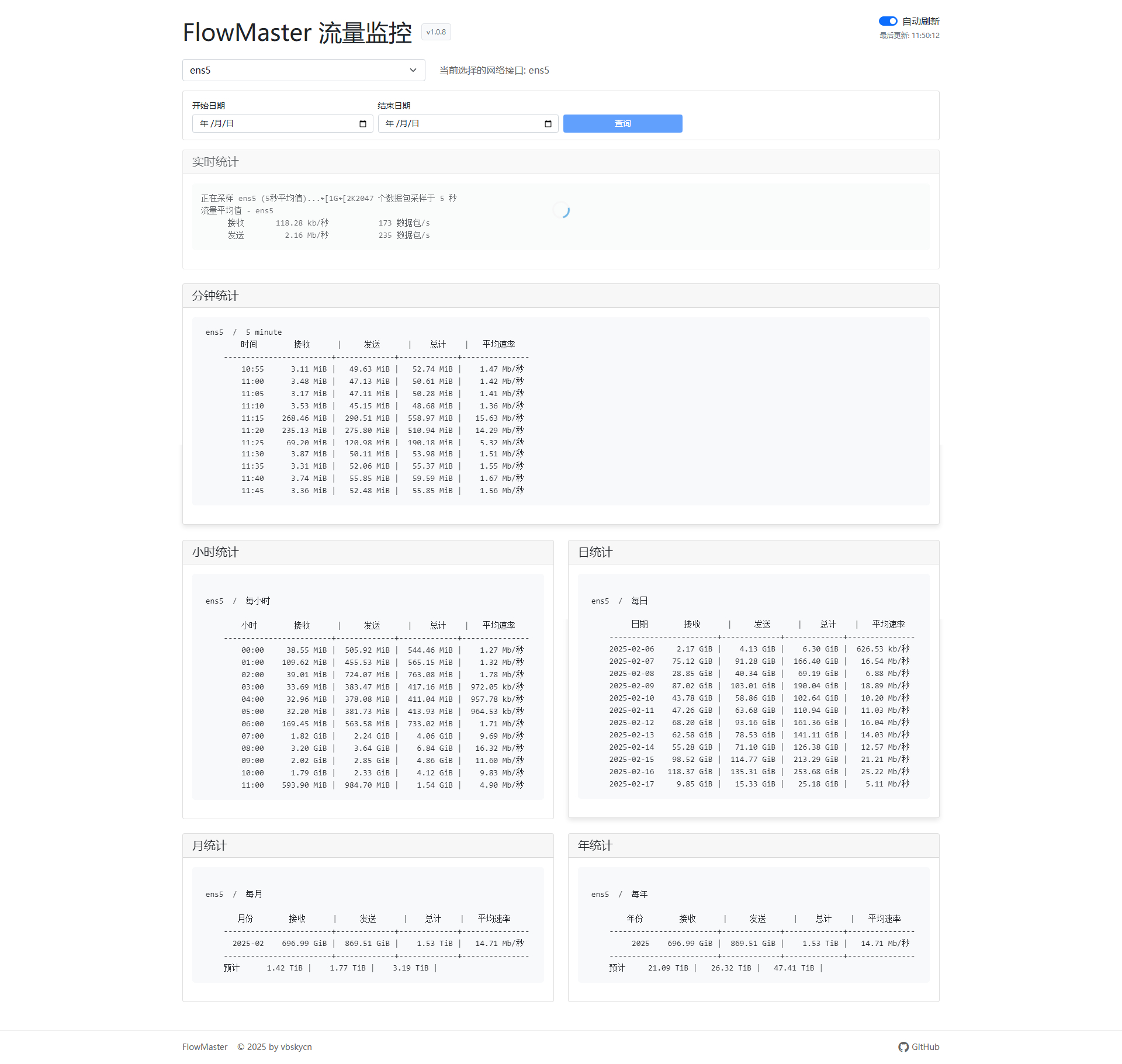
FlowMaster 是一个基于 vnstat 的专业网络流量监控系统,提供实时流量统计、历史数据分析等功能。系统采用现代化的 Web 界面,支持多网卡监控,让网络流量监控变得简单而强大。
✨ 主要特性
- 🚀 实时流量监控
- 📊 多维度数据统计(分钟、小时、日、月、年)
- 🌐 多网卡支持
- 🎯 自动刷新功能
- 📱 响应式设计,支持移动端
- 🌙 现代深色主题
- 🔄 数据自动更新
🛠️ 技术栈
| 组件 | 技术 |
|---|---|
| 后端框架 | Node.js Express |
| 前端框架 | Vue 3 Bootstrap 5 |
| 监控工具 | vnstat |
| 接口类型 | RESTful API |
📦 安装部署
环境要求
| 组件 | 版本 |
|---|---|
| Node.js | 14.0.0 或更高版本 |
| vnstat | 2.0.0 或更高版本 |
| 包管理器 | npm 或 yarn |
一键部署
curl -o install.sh https://raw.githubusercontent.com/vbskycn/FlowMaster/main/install.sh && chmod x install.sh && sudo ./install.sh
国内机器
curl -o install.sh https://gh-proxy.com/https://raw.githubusercontent.com/vbskycn/FlowMaster/main/install.sh && chmod x install.sh && sudo ./install.sh
如果一键安装失败建议使用手动pm2部署,可以看到是哪一步出了问题
常用命令
启动服务:
flowmaster start
停止服务:
flowmaster stop
重启服务:
flowmaster restart
查看状态:
flowmaster status
卸载服务:
flowmaster uninstall
访问方式
安装完成后,通过浏览器访问:http://服务器IP:10089
注意:请确保防火墙已放行 10089 端口
手动安装步骤
1. 安装 vnstat
# Debian/Ubuntu
sudo apt-get install vnstat

# CentOS
sudo yum install vnstat
2. 安装 PM2
# 全局安装 PM2
sudo npm install -g pm2

# 设置 PM2 开机自启
sudo pm2 startup
3. 克隆项目
git clone https://github.com/vbskycn/FlowMaster.git
cd FlowMaster
4. 安装依赖
npm install
# 或
yarn install
5. 使用 PM2 启动服务
# 启动服务
pm2 start server.js --name flowmaster

# 保存 PM2 配置
pm2 save
6. PM2 管理命令
# 查看服务状态
pm2 status flowmaster

# 查看服务日志
pm2 logs flowmaster

# 重启服务
pm2 restart flowmaster

# 停止服务
pm2 stop flowmaster

# 删除服务
pm2 delete flowmaster

# 查看详细信息
pm2 show flowmaster

# 监控服务
pm2 monit
默认访问地址:http://localhost:10089
7.更新脚本
cd FlowMaster #进入脚本目录
git pull #更新仓库
pm2 restart flowmaster进程 #重进flowmaster进程
🔧 配置说明
使用 PM2 设置环境变量:
# 设置端口
pm2 start server.js --name flowmaster --env PORT=8080

# 或在 ecosystem.config.js 中配置
echo 'module.exports = {
  apps: [{
    name: "flowmaster",
    script: "server.js",
    env: {
      PORT: 8080
    }
  }]
}' > ecosystem.config.js

# 使用配置文件启动
pm2 start ecosystem.config.js
📖 使用说明
- 系统启动后,自动检测可用网卡
- 在界面上选择要监控的网卡
- 查看实时流量和历史统计数据
- 可开启自动刷新功能,实时更新数据
🤝 贡献指南
欢迎提交 Issue 和 Pull Request!
- Fork 本项目
- 创建新分支:
git checkout -b feature/AmazingFeature - 提交更改:
git commit -m 'Add some AmazingFeature' - 推送分支:
git push origin feature/AmazingFeature - 提交 Pull Request
📄 开源协议
本项目采用 MIT 协议开源,详见 http://127.0.0.1:5001/LICENSE 文件。
👨💻 作者
vbskycn
- GitHub: @vbskycn
🙏 致谢
📞 联系方式
如有问题或建议,欢迎通过以下方式联系:
如果这个项目对你有帮助,欢迎 star ⭐️


1楼
已star
不错