异地存储直接本地挂载腾讯云对象存储。
挂载路径:/www/cosfs/btbak-hk
要备份的数据路径:/www/wwwroot
备份软件:borg
文档:https://borgbackup.readthedocs.io/en/stable/index.html
备份保存方案:
- 保存最近7天的每天备份
- 保存最近4个周的每周备份
- 保存最近6个月的每月备份
自动备份脚本代码:
#!/bin/sh

# Setting this, so the repo does not need to be given on the commandline:
export BORG_REPO=/www/cosfs/btbak-hk/btbak

# See the section "Passphrase notes" for more infos.
# export BORG_PASSPHRASE='************'

# some helpers and error handling:
info() { printf "
%s %s

" "$( date )" "$*" >&2; }
trap 'echo $( date ) Backup interrupted >&2; exit 2' INT TERM

info "Starting backup"

# Backup the most important directories into an archive named after
# the machine this script is currently running on:

borg create                         \
    --verbose                       \
    --filter AME                    \
    --list                          \
    --stats                         \
    --show-rc                       \
    --compression zstd,13           \
    ::'{hostname}-{now}'            \
    /www/wwwroot

backup_exit=$?

info "Pruning repository"

# Use the `prune` subcommand to maintain 7 daily, 4 weekly and 6 monthly
# archives of THIS machine. The '{hostname}-*' matching is very important to
# limit prune's operation to this machine's archives and not apply to
# other machines' archives also:

borg prune                          \
    --list                          \
    --glob-archives '{hostname}-*'  \
    --show-rc                       \
    --keep-daily    7               \
    --keep-weekly   4               \
    --keep-monthly  6

prune_exit=$?

# actually free repo disk space by compacting segments

info "Compacting repository"

borg compact

compact_exit=$?

# use highest exit code as global exit code
global_exit=$(( backup_exit > prune_exit ? backup_exit : prune_exit ))
global_exit=$(( compact_exit > global_exit ? compact_exit : global_exit ))

if [ ${global_exit} -eq 0 ]; then
    info "Backup, Prune, and Compact finished successfully"
elif [ ${global_exit} -eq 1 ]; then
    info "Backup, Prune, and/or Compact finished with warnings"
else
    info "Backup, Prune, and/or Compact finished with errors"
fi

exit ${global_exit}
设置脚本每天执行一次即可。
- 其中,
--compression zstd,13为压缩方式zstd,压缩级别13,数字范围1-22,越大压缩比越大,但CPU占用越大,速度越慢。
第一次备份是整站所有数据,从第二次备份开始,只增加变化的数据。
效果:
第一次备份:
10M小带宽,4.86G数据备份到腾讯云对象存储,
耗时3个半小时。

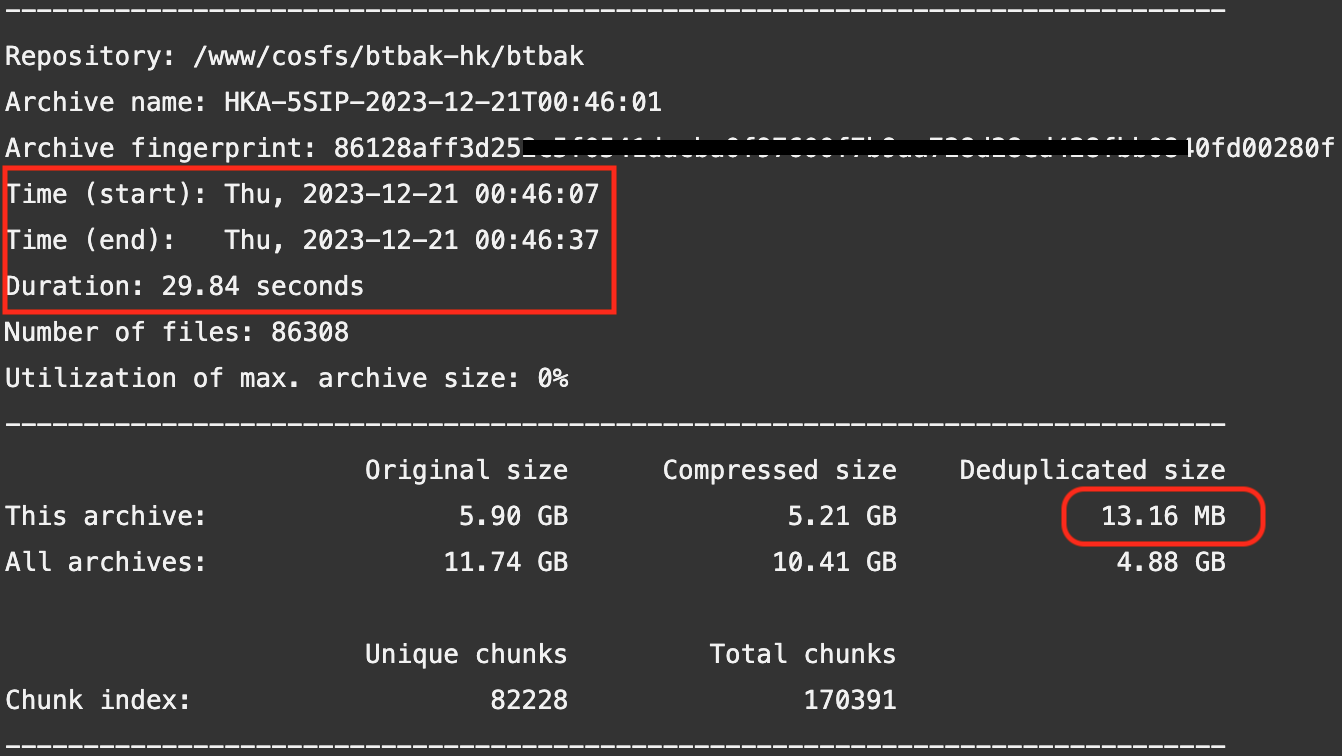
第二次备份:
软件自动计算增量数据,需要传输的数据只有13.16MB,
备份时间29.84秒。


不错收藏了
感谢分享